How to Withdraw Money from PayPal to M-PESA (2026): The Updated Super App Guide
For Kenyan freelancers, remote workers, and e-commerce platform owners looking to cash in on their global earnings accepted via PayPal, getting actually paid in a locally usable method is a must, otherwise there's no point of having money you can't spend. The official partnership between PayPal and M-PESA is still the easiest way to get your cash directly into your pocket.
In 2026 Safaricom has shifted the entire service to the MPESA app. What was previously the external www.payal-mobilemoney.com/m-pesa portal to access your cash has now been smoothly integrated into the M-PESA Super App under the Global tab. Thanks to Safaricom doing the hard work to bring the service inhouse.
This change gives you a way more secure, one-tap experience without having to visit any external websites. Below is the updated guide to withdrawing your funds in 2026.
1. Before You Start
To use the official PayPal to M-PESA service youll need to check a couple of things first:
-
Make sure your PayPal is all set up and verified: Your PayPal account needs to be a Kenyan registered one and all verified.
-
Registered on M-PESA too: The phone number linked to your M-PESA needs to be active and in your name.
-
Make your details match up: Your name and national ID number on PayPal must be the same as the details on your M-PESA account. If they're not, your transaction is likely to get rejected.
2. Why the Switch?
The old website that has been utilized for the service www.paypal-mobilemoney.com/m-pesa has been gradually phased out for the M-PESA Global integration. By bringing the service inhouse, Safaricom has improved the user experience with:
-
Faster Authentication: Gone are the days of waiting for OTPs - with biometric login on your smartphone, this is now super fast.
-
Tracking your progress in real time: See where your money is at in your transaction history.
-
Unified limits: Your PayPal withdrawals are in sync with your daily M-PESA limits (KES 500,000).
3. How to Withdraw via the M-PESA Super App
Below is the new updated 2026 method of withdrawing PayPal earnings to MPESA.
The Steps are:
-
Fire up the M-PESA Super App: Make sure you're running the latest version from the App Store or Google Play.
-
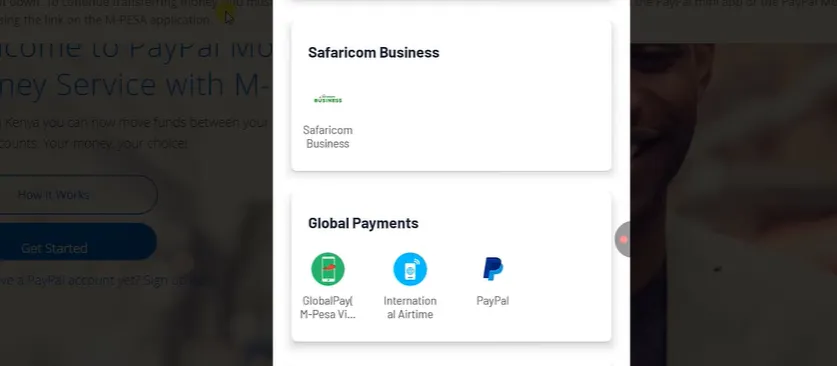
Go to "Services" - then to Global: Hit the "Services" tab and find the mini-app for "M-PESA Global" - its probably under "International Transfers".
-
Select the PayPal icon: Tap on the PayPal icon from within the Global menu.
-
Link your accounts (first time only): If you havent already linked your accounts in the app, you'll be asked to log in to PayPal and grant Safaricom permission to access your cash.
-
Tap "Withdraw from PayPal": You will see how much is available in your PayPal account.
-
Choose your amount: Put in the amount you want to transfer in USD. The app will show you the current exchange rate and how much cash youll get in KES.
-
Confirm with PIN or biometric login: Enter your M-PESA PIN or use your phone's biometric login. Your cash should arrive in your wallet within minutes for amounts under KES 50,000.
4. The Old Method - Using USSD
If you dont have a smartphone or data, you can still use the old USSD way:
-
Dial *840#.
-
Choose Option 4: PayPal.
-
Follow the on-screen prompts to view your PayPal balance and start a withdrawal.
M-PESA Balance Limits
Just a heads up: as of 2026, any M-PESA account balance will be capped at KES 500,000. If you're planning on making a withdrawal that would take you over this limit, be aware that the transaction will simply not go through. Make sure you leave some wiggle room in your M-PESA wallet before trying to take out cash.
5. Tips for Freelancers in Kenya
-
Keep an Eye on Exchange Rates: These numbers change all the time. If you don't have to have the money now, hang on till you get a better USD to KES exchange rate, that way you can get the most for your earnings.
-
Withdraw in Bulk: Yes, the 3% fee is the same no matter what, but withdrawing bigger sums just means fewer SMS's to deal with and less bookkeeping.
-
Security above All: Never give out your PayPal password or your M-PESA PIN to anyone. The official PayPal will never ask you for your M-PESA PIN, they'll only want an OTP sent to your phone to verify your identity.
Expert Comment: If you're dealing with really large sums (anywhere over $3,000), you might want to look at using the Equity Bank PayPal withdrawal service instead. It might take a day or two, but their conversion rates can sometimes be more in your favour than the 3% flat fee on the M-PESA portal.
6. Withdrawal Costs and Limits 2026
The service is still pretty competitively priced, but you should factor in the currency conversion when you're doing the maths.
| Feature | Details (2026) |
| Transaction Fee | 3% (Currency Conversion Fee) |
| Processing Time | Instant to 2 Hours (Large amounts may take up to 3 days) |
| Minimum Withdrawal | $1 |
| Max Per Transaction | KES 250,000 |
| Max Daily Limit | KES 500,000 |
7. Key Reminders for 2026
-
Name Matching: Make sure the name on your PayPal account matches the name on your M-PESA registration exactly. If there's any discrepancy - like "John Kamau Doe" on your ID but "John Doe" on PayPal - the automated system might flag the transaction.
-
Primary Currency: Make sure your money is in USD within PayPal. If you've got Euros or GBP just chill, convert them to USD inside your PayPal account before you try to make the withdrawal.
-
Your Account's Good up to Here: If your M-PESA balance is already maxed out at KES 480,000, and then you go and try to withdraw KES 30,000 - don't be surprised if the transaction fails. Always clear your M-PESA wallet if a big transfer is due.
Summary: Has the old website gone?
Yes, the old website has been retired. The paypal-mobilemoney.com/m-pesa portal is no longer supported, and some old links may no longer work. For the best security and speed you should now use the M-PESA Super App or the *840# USSD code.
Expert Note: If you're a high-volume freelancer earning over $5,000 a month, you might want to look into Equity Bank’s PayPal integration. It's not as immediate as M-PESA, but it can sometimes give you a bit better exchange rates for really large sums.