How to Change or Reset M-PESA PIN: A Secure Step-by-Step Guide
As M-PESA hits 19 years of operation with over 40 million active users on board, security is and will continue to be at the very heart of Kenya's digital economy. Your 4 digit M-PESA PIN is the sole barrier standing between your hard-earned cash and potential scammers.
Whether you suspect your PIN has been compromised or you simply have forgotten it after a long break away, Safaricom has made the recovery process in 2026 a whole lot faster and more secure. You can now sort it out yourself.
How to Change Your M-PESA PIN (If You Still Know the Old One)
Its generally a good idea to change your PIN every 3 to 6 months - that way you're keeping your security high. You can do this in three different ways:
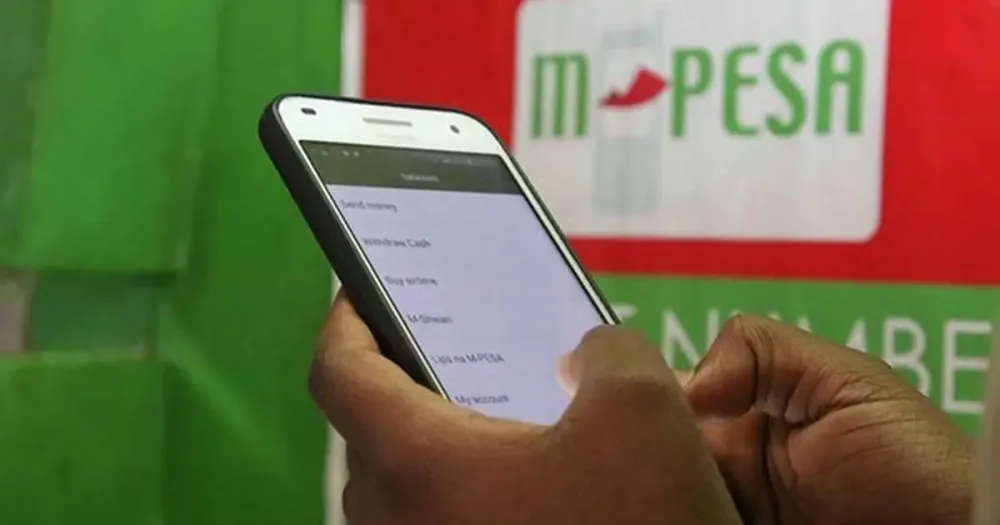
Method A: Using USSD *334# (Best Option)
- Dial *334# on your Safaricom line.
- Select Option 7: My Account.
- Select Option 3: M-PESA PIN Manager.
- Select Option 1: Change M-PESA PIN.
- Enter your Current PIN.
- Enter your New 4-digit PIN and confirm it.
- You will receive an SMS confirmation from M-PESA.
Method B: Using the M-PESA Super App
-
Get the M-PESA Super App fired up and logged in.
-
Tap the Your Profile picture in the top left corner.
-
Head on over to Settings > Security.
-
Select Change M-PESA PIN.
-
Enter your old PIN once you're logged in, then sort out a new one.
Method C: Using your SIM Toolkit
-
Take a look for the SIM Toolkit (its normally labelled as either Safaricom or M-PESA) on your phone.
-
Scroll down and select My Account > Change PIN.
-
Then input your current PIN, followed by your new one and confirm it.
How to Reset a Forgotten M-PESA PIN (By Yourself)
For several months now, Safaricom has simplified services that one can easily access from the MPESA super app or via ussd and you nolonger have to worry about having to head to a Safaricom shop because you cant remember your PIN. As long as you remember your National ID and have set up some Security Questions beforehand, you can reset it yourself.
The Self-Reset Steps (*334#) are pretty straightforward:
-
Dial *334#.
-
Pick My Account > M-PESA PIN Manager > Option 2: Forgot PIN.
-
Enter your ID number - just like with your passport.
-
Answer one of those Security Questions you set up (e.g. "What was your first school?").
-
If you get that right, you'll be prompted to come up with a New PIN and confirm it.
Thing to keep in mind: If you havnt set up security questions yet, dial *334#, then My Account > M-PESA PIN Manager > Set M-PESA PIN Security Questions pronto.
Getting Your Account Unlocked After 5 Wrong Tries
If your account gets locked after 5 incorrect PIN attempts (which is a good thing, by the way - its for protection), heres how to unlock it
-
Dial *334# and navigate to My Account > M-PESA PIN Manager > M-PESA PIN Unlock.
-
Then youll need to verify your ID number to get your account working again.
Top Security Tips for 2026
Vigilance is a must when it comes to social engineering scams - here are a few things to keep in your head:
The 7-day SIM Swap Cool Down Period
If youve recently replaced your SIM card (SIM swap) within the last 7 days, Safaricom wont let you reset your PIN using USSD. You'll need to get in touch with a Safaricom shop with your original ID to sort it out yourself.
Choosing a Strong PIN
The mistakes you should really be avoiding when it comes to setting your account up for a potential hack are:
-
Your birth year: (e.g. 1994, 1980) - they're literally the first thing the hackers will try.
-
Simple sequences: (e.g. 1234, 0000, 2580). Any numbers that just won't have to be guess - skip these.
-
Phone digits: Don't even think about using the last four digits of your phone number as your PIN.
The Golden Rule of Safety
If someone you think might be Safaricom is calling and asking for your PIN, don't even bother to try and verify it - hang up right away, especially if they're calling from a personal number and not the Safaricom number : 0722 000 000. And if they're asking you to "dial a code to sort out a transaction," don't bother, just hang up.
Summary Table - Choosing the Right Method
| Scenario | Recommended Method | Requirement |
| I know my PIN but want to change it | USSD *334# or App | Current PIN |
| I forgot my PIN (Self-Service) | USSD *334# | ID Number & Security Qs |
| I forgot my PIN (No Security Qs) | Safaricom Shop | Original National ID |
| I just swapped my SIM card | Safaricom Shop | Original National ID |
| My account is locked (5 tries) | USSD *334# | ID Number |
A little tip: get Biometric Authentication (Fingerprint or Face ID) enabled in the M-PESA Super App. that way you can do transactions without typing your PIN when you're out and about, which reduces the risk of someone watching over your shoulder and getting your code.
Need any more help? We're here for you - you can have a chat with Zuri on WhatsApp (0722 000100) or give our official M-PESA support a call on 234.
One thing to establish first - are you able to even get to your M-PESA menu at the moment, or is your line currently blocked?